Write it scene by scene. Hear it in AI voices. เขียนบทเป็นฉาก แล้วฟังด้วยเสียง AI

A free macOS app for AI voice-overs. Listen free with your Mac's own voices while you write, then generate the real take with Gemini TTS on your own key. Every take is kept. แอป macOS ฟรีสำหรับทำเสียงพากย์ AI ลองฟังฟรีด้วยเสียงของ Mac ระหว่างเขียน แล้วสร้างเสียงจริงด้วย Gemini TTS ผ่าน key ของคุณเอง ทุก take เก็บไว้ให้

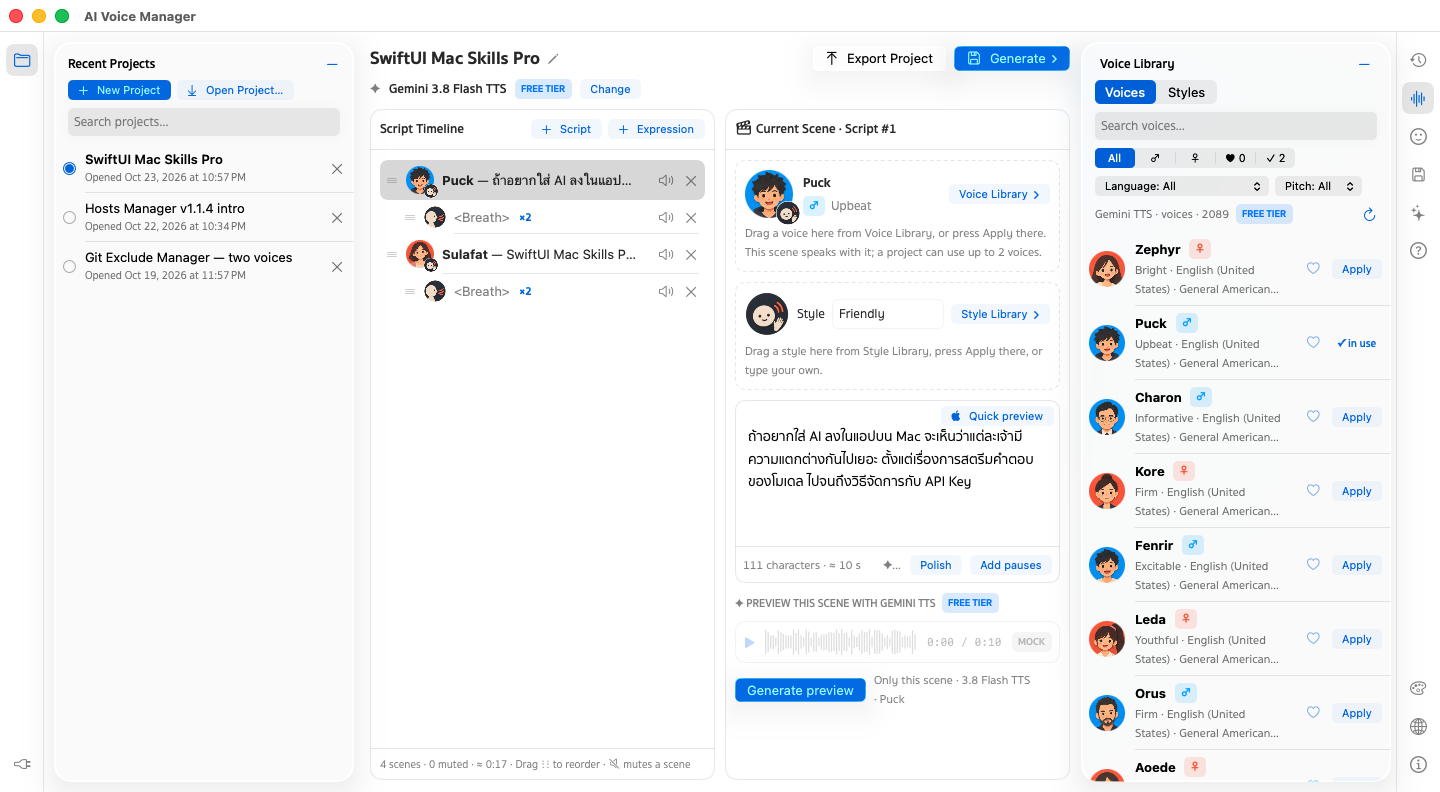
AI Voice Manager window: Recent Projects on the left, a Script Timeline of lines and breaths, the Current Scene with its voice and style, and the Voice Library with Gemini voices, portraits and favourites
  • Free and open sourceฟรีและโอเพนซอร์สMIT license, no adsสัญญาอนุญาต MIT ไม่มีโฆษณา
  • Native macOS appแอป macOS แท้Apple silicon, macOS 14+, Liquid Glass on macOS 26Apple silicon, macOS 14 ขึ้นไป, Liquid Glass บน macOS 26
  • Your key, your Mackey ของคุณ เครื่องของคุณNo account with us; projects are plain filesไม่ต้องสมัครกับเรา โปรเจกต์เป็นไฟล์ธรรมดา
  • 12 languages12 ภาษาSearch and switch in the Language panelค้นหาและสลับภาษาได้ในแผง Language

See every feature in six minutesดูทุกฟีเจอร์ใน 6 นาที

From install to a finished WAV: key, project, timeline, voices, free listening, Generate, AI Agent and History. Narrated in Thai by Gemini TTS, with Thai and English subtitles.ตั้งแต่ติดตั้งจนได้ไฟล์ WAV: คีย์ โปรเจกต์ ไทม์ไลน์ เสียง ฟังฟรี สร้างเสียง AI Agent และ History พากย์ไทยด้วย Gemini TTS พร้อมคำบรรยายไทยและอังกฤษ

A voice-over studio that keeps your workสตูดิโอพากย์เสียงที่ไม่ทำงานของคุณหาย

No more losing a good take when you leave the playground. Projects save themselves, and every take stays in Results.ไม่ต้องเสีย take ดีๆ เพราะปิดหน้า playground อีกต่อไป โปรเจกต์บันทึกเอง และทุก take อยู่ใน Results

A script you can rearrangeบทที่จัดเรียงใหม่ได้

Every line and every pause is a scene. Drag to reorder, mute a scene to leave it out of the take, and give each line its own voice and style.ทุกบรรทัดและทุกช่วงหยุดคือหนึ่งฉาก ลากสลับลำดับได้ ปิดเสียงฉากที่ไม่อยากให้อยู่ใน take และกำหนดเสียงกับสไตล์ให้แต่ละบรรทัดได้
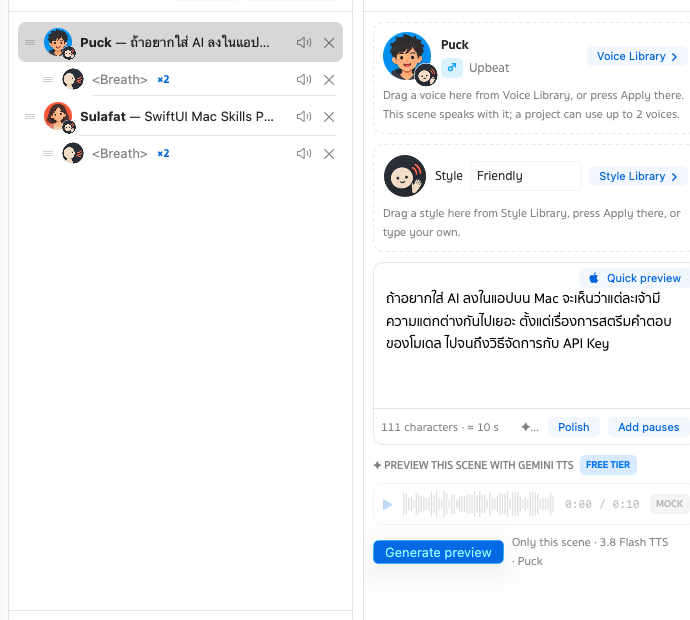
Script Timeline with two lines and two breaths, next to the Current Scene showing its voice, its style and the line's text

2,000+ Gemini voicesเสียง Gemini กว่า 2,000 แบบ

The same library as Google AI Studio; the 30 with portraits come first. Filter ♂ ♀, search, ♥ the ones you use most and see ✓ the ones in this project.คลังเดียวกับ Google AI Studio · 30 เสียงที่มีรูปอยู่ด้านบนก่อน กรอง ♂ ♀ ค้นหา กด ♥ เสียงที่ใช้บ่อย และดู ✓ เสียงที่ใช้ในโปรเจกต์นี้

Two voices in one takeสองเสียงใน take เดียว

Gemini speaks a conversation in one go: give a line the other voice and it becomes the second speaker.Gemini พูดเป็นบทสนทนาได้ในครั้งเดียว แค่ให้บรรทัดนั้นใช้อีกเสียง ก็กลายเป็นผู้พูดคนที่สอง

Breaths, pauses and laughsหายใจ เว้นจังหวะ และหัวเราะ

Drag an expression between two lines — breath, short or long pause, laugh, sigh, gasp, cough — and repeat it up to ×10.ลาก expression ไปวางระหว่างบรรทัด ทั้งหายใจ เว้นสั้น เว้นยาว หัวเราะ ถอนหายใจ ตกใจ ไอ และให้ซ้ำได้สูงสุด ×10
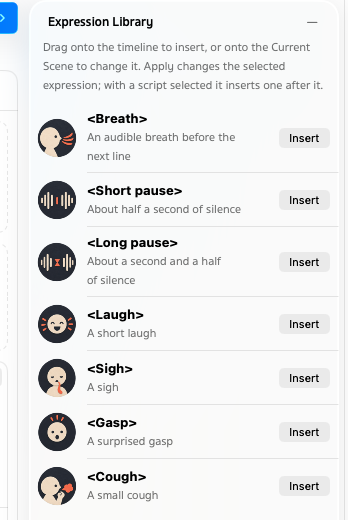
Expression Library: Breath, Short pause, Long pause, Laugh, Sigh, Gasp and Cough, each with a paper-collage icon and an Insert button

Hear it before you payฟังก่อนจ่าย

Quick preview reads the line with your Mac's voices, free and instant. Generate preview makes just one scene with Gemini. Only then the whole take.Quick preview อ่านบรรทัดด้วยเสียงของ Mac ฟรีและทันที Generate preview สร้างเสียงจริงแค่ฉากเดียว แล้วค่อยสร้างทั้ง take

# Rami · Friendly
Still editing /etc/hosts in vim?
<short pause>
Hosts Manager does it in one click.

# Mali · Calm
<breath> ×2

Every take keptเก็บทุก take

Results keeps every take. Play it with its waveform, download the WAV, or bring its timeline back. History keeps your last 30 edits per project.Results เก็บทุก take ไว้ เล่นพร้อมดู waveform ดาวน์โหลด WAV หรือดึงไทม์ไลน์ของ take นั้นกลับมาได้ ส่วน History เก็บการแก้ไข 30 ครั้งล่าสุดของแต่ละโปรเจกต์
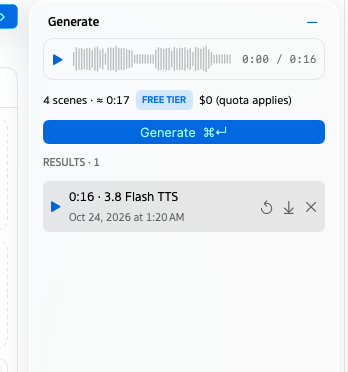
Generate panel: the take's waveform in the player, the project's scenes, length and price, the Generate button and three takes in Results

Make it yoursปรับให้เป็นสไตล์คุณ

Liquid Glass on macOS 26 and Sukhumvit Set type. Light, Dark or System, 16 accent colours and 8 gradient themes.Liquid Glass บน macOS 26 และฟอนต์ Sukhumvit Set เลือก Light, Dark หรือตามระบบ สี accent 16 สี และธีม gradient 8 แบบ
From script to voice-overจากบทสู่เสียงพากย์

Five steps, and only the last two talk to Google.ห้าขั้นตอน และมีแค่สองขั้นสุดท้ายที่ติดต่อ Google

  1. Writeเขียนบท

    Type the lines, or open a project exported from another Mac.พิมพ์บท หรือเปิดโปรเจกต์ที่ส่งออกมาจาก Mac เครื่องอื่น

  2. Castเลือกเสียง

    Drag a voice and a style onto each scene, and a breath or pause between them.ลากเสียงและสไตล์ไปวางที่แต่ละฉาก และวางหายใจหรือเว้นจังหวะไว้ระหว่างฉาก

  3. Listen freeฟังฟรี

    Quick preview reads it with your Mac's voices — nothing leaves your Mac.Quick preview อ่านด้วยเสียงของ Mac ไม่มีอะไรออกจากเครื่อง

  4. Preview a sceneลองฟังหนึ่งฉาก

    Gemini makes just that scene, in the voice the take will use.Gemini สร้างเสียงเฉพาะฉากนั้น ด้วยเสียงเดียวกับที่ take จะใช้

  5. Generateสร้างเสียง

    The whole project becomes one take, saved as a WAV next to its timeline.ทั้งโปรเจกต์กลายเป็นหนึ่ง take บันทึกเป็นไฟล์ WAV คู่กับไทม์ไลน์ของมัน

Gemini runs on your own Google API key, kept in your Keychain. On the free tier a take costs nothing, but Google may use your text and audio to improve its products. With billing on, the app shows the price in US dollars and your currency and asks before every paid take.Gemini ทำงานด้วย Google API key ของคุณเอง เก็บไว้ใน Keychain ถ้าใช้ free tier สร้าง take ไม่เสียเงิน แต่ Google อาจนำข้อความและเสียงไปพัฒนาผลิตภัณฑ์ ถ้าเปิด billing แอปจะแสดงราคาเป็นดอลลาร์และสกุลเงินของคุณ และถามก่อนสร้าง take ที่เสียเงินทุกครั้ง

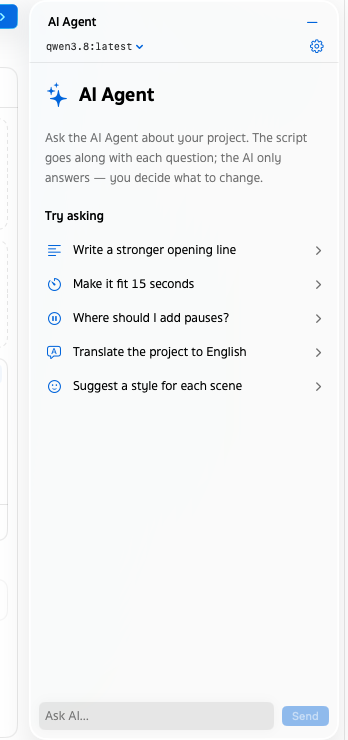
AI Agent panel on qwen3.8 with one-click questions such as Write a stronger opening line and Where should I add pauses?

AI Agent

A script helper, with the AI you pickผู้ช่วยเขียนบท ด้วย AI ที่คุณเลือก

Pick who helps: Apple or Ollama on your Mac, or OpenAI, Gemini or Claude with your own key. It has no voices — it helps with the words, and never changes your project without you.เลือกผู้ช่วยได้เอง: Apple หรือ Ollama ในเครื่องของคุณ หรือ OpenAI, Gemini, Claude ด้วย key ของคุณเอง ไม่มีเสียงของตัวเอง ช่วยแค่เรื่องถ้อยคำ และไม่แก้โปรเจกต์โดยที่คุณไม่ได้สั่ง

  • Polish rewrites one scene so it sounds natural spoken. Add pauses places breaths and short pauses. One click, one step in History.Polish เกลาบทหนึ่งฉากให้พูดแล้วเป็นธรรมชาติ Add pauses ใส่จังหวะหายใจและเว้นจังหวะให้ คลิกเดียว ย้อนได้ใน History
  • Ask about the whole project — “Make it fit 15 seconds”, “Suggest a style for each scene” — and watch the answer stream in.ถามเรื่องทั้งโปรเจกต์ได้ เช่น “ย่อให้พอดี 15 วินาที” หรือ “แนะนำสไตล์ของแต่ละฉาก” แล้วดูคำตอบค่อยๆ แสดงขึ้นมา
  • With Apple or Ollama, nothing you ask leaves your Mac. With OpenAI, Gemini or Claude, your question and the script go to that provider.ใช้ Apple หรือ Ollama สิ่งที่ถามไม่ออกนอกเครื่อง ถ้าใช้ OpenAI, Gemini หรือ Claude คำถามและบทจะส่งไปยังผู้ให้บริการนั้น
  • The app tells you when the internet drops, comes back or slows down — and keeps your edits saved either way.แอปบอกเมื่ออินเทอร์เน็ตหลุด กลับมา หรือช้าลง และงานที่แก้ยังบันทึกอยู่เสมอ
Google Gemini TTS Ollama Apple voices

Also by the same authorจากผู้พัฒนาคนเดียวกัน

Hosts Manager

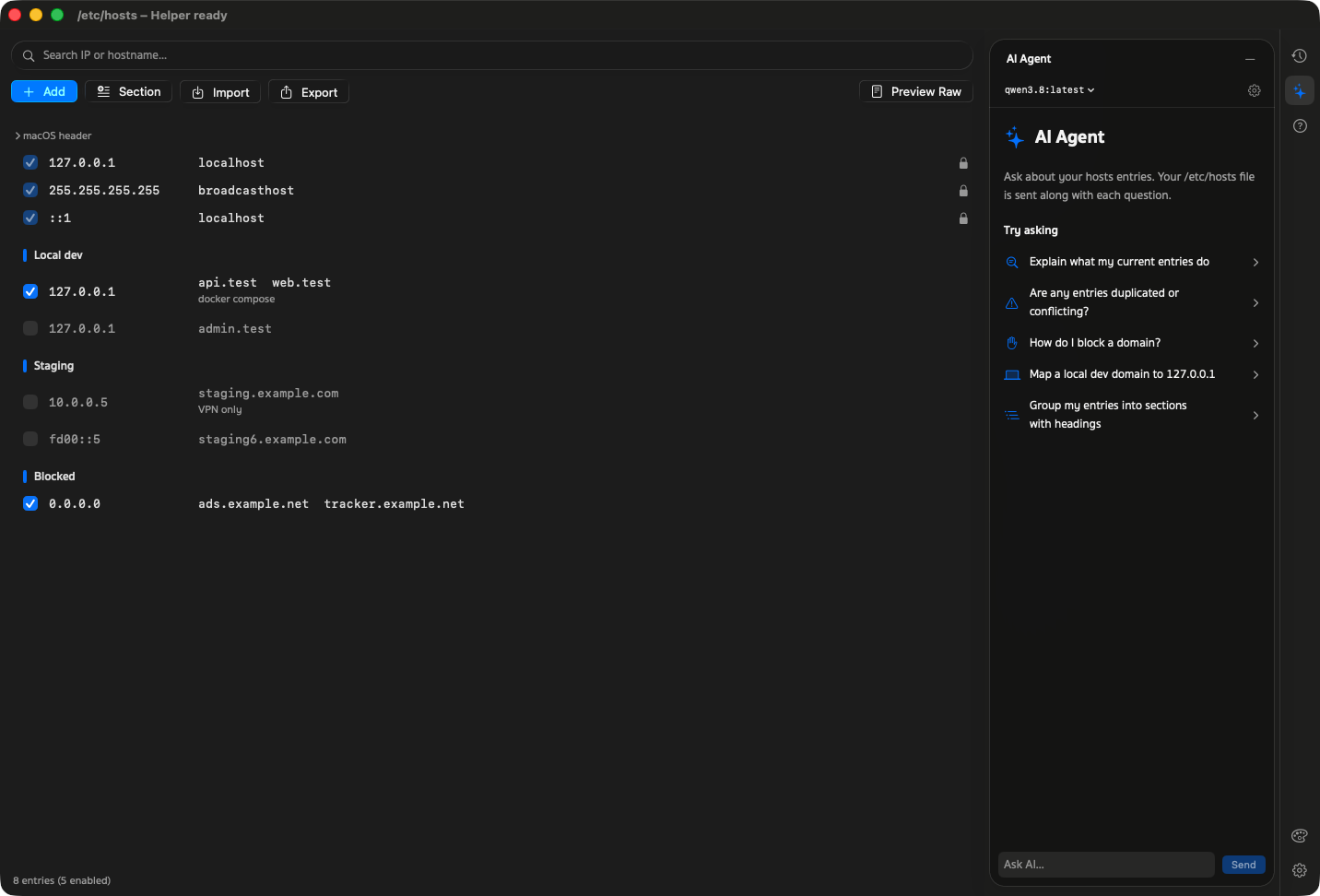
The same window and the same ideas, for /etc/hosts. Point domains at your local server, block trackers and undo any save, without sudo in a terminal.หน้าตาและแนวคิดเดียวกัน แต่สำหรับ /etc/hosts ชี้โดเมนมาที่เซิร์ฟเวอร์ในเครื่อง บล็อก tracker และย้อนการบันทึกได้ โดยไม่ต้องพิมพ์ sudo ใน Terminal

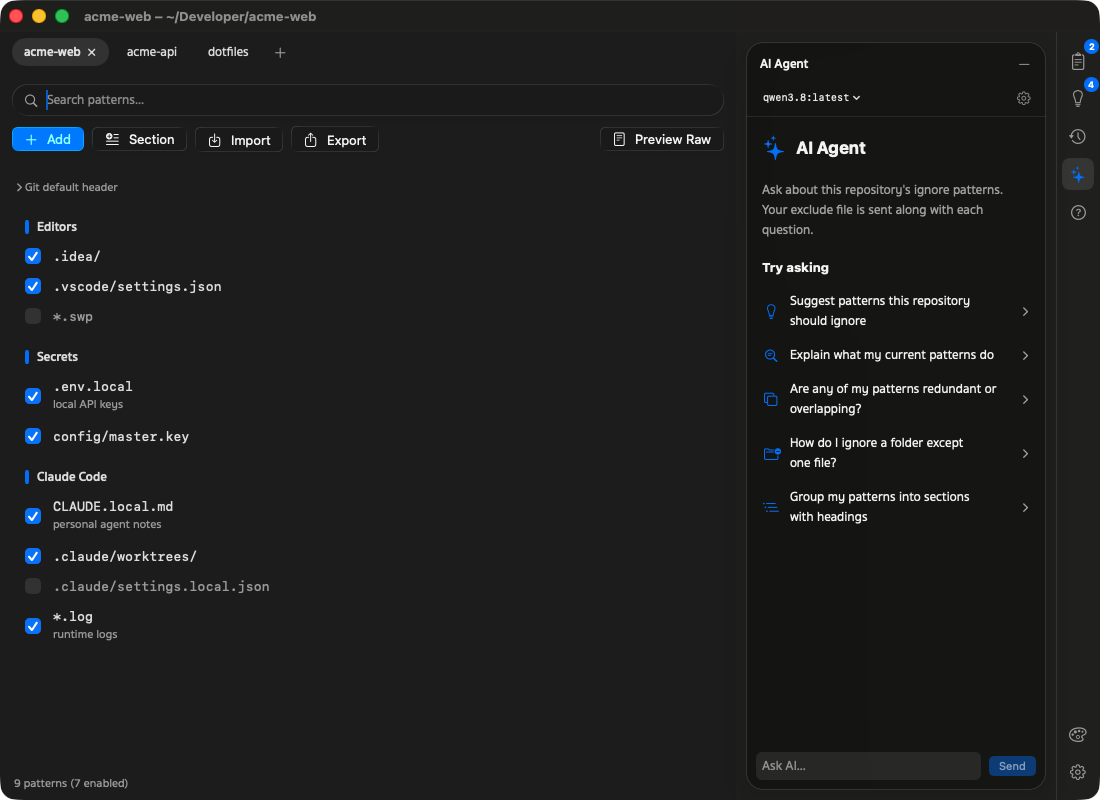
Hosts Manager window with /etc/hosts entries grouped into Local dev, Staging and Blocked sections

Git Exclude Manager

Keep local files out of git status. Edit .git/info/exclude in a native window, with sections, History and pattern sharing between repositories.ซ่อนไฟล์ส่วนตัวจาก git status แก้ .git/info/exclude ในหน้าต่าง Mac แบ่งหมวดได้ มี History และแชร์ pattern ข้าม repository ได้

Git Exclude Manager window with repository tabs and patterns grouped into Editors, Secrets and Claude Code sections

Get AI Voice Manager for your Macใช้ AI Voice Manager บน Mac ของคุณ

Free and open source. Bring a Gemini API key from Google AI Studio and you're ready.ฟรีและโอเพนซอร์ส แค่มี Gemini API key จาก Google AI Studio ก็พร้อมใช้งาน