Free Claude Code pluginClaude Code plugin ฟรี

One plugin. Claude builds a Liquid Glass Mac app the right way. ติดตั้ง plugin เดียว Claude ก็สร้างแอป Mac แบบ Liquid Glass ได้ถูกวิธี

Four skills taken from two shipping macOS apps: a SwiftUI app with no Xcode project, real Liquid Glass, an IDE-style panel rail, and accent and gradient themes. 4 skill จากแอป macOS ที่ใช้งานจริงสองตัว: แอป SwiftUI ที่ไม่ต้องมี Xcode project, Liquid Glass ที่ขึ้นจริง, แผงเครื่องมือแบบ IDE และธีมสี accent กับ gradient

/plugin marketplace add gomin2013/swiftui-mac-skills
/plugin install gomin-mac-kit@gomin
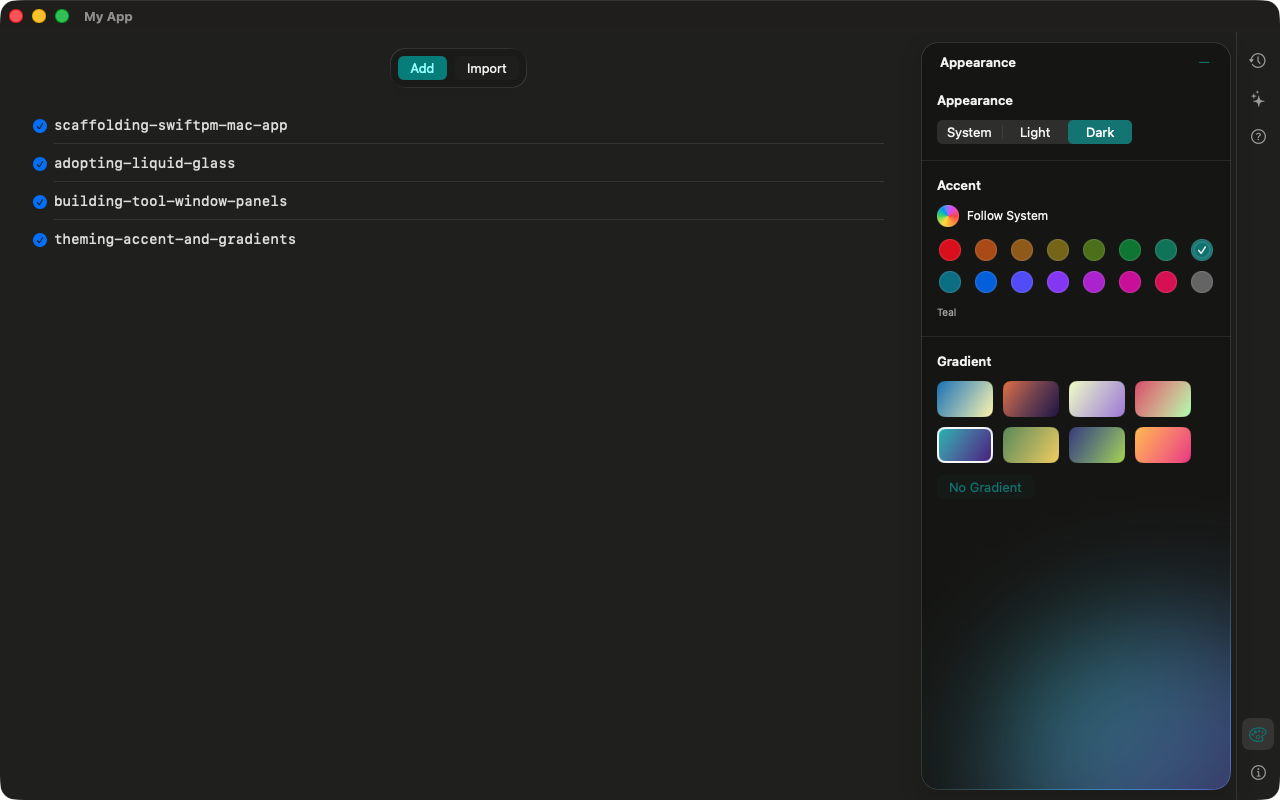
A Mac app built with the four skills: Liquid Glass tool window with the Appearance panel, 16 accent colours and 8 gradient themes
  • Free and open sourceฟรีและโอเพนซอร์สMIT licenseสัญญาอนุญาต MIT
  • Native macOSmacOS แท้Swift 6, macOS 14+, Liquid Glass on macOS 26Swift 6, macOS 14 ขึ้นไป, Liquid Glass บน macOS 26
  • Zero dependenciesไม่มี dependencyPlain Swift Package, no Xcode projectSwift Package ล้วน ไม่มี Xcode project
  • Testedทดสอบแล้วEvery template compiles and its tests passทุก template คอมไพล์ผ่านและ test ผ่าน

See it in 50 secondsดูการใช้งานใน 50 วินาที

Install, ask Claude for an app, get real Liquid Glass. Narrated in Thai, with captions.ติดตั้ง บอก Claude ว่าอยากได้แอปแบบไหน แล้วได้ Liquid Glass จริง พากย์ไทยพร้อมคำบรรยาย

Four skills, each with code that compiles4 skill แต่ละตัวมีโค้ดที่คอมไพล์ผ่านจริง

Claude picks the right one by itself. Each carries the pitfalls we hit, not just the happy path.Claude เลือกใช้เอง แต่ละ skill มีข้อควรระวังที่เราเจอมาจริง ไม่ใช่แค่ตัวอย่างที่ทุกอย่างราบรื่น

App scaffoldโครงแอป

A Dock app from a Swift Package, a build script that makes a signed .app, and the fix most people miss: swift build stamps the binary with SDK 14, so macOS 26 draws it without Liquid Glass.แอปบน Dock จาก Swift Package สคริปต์ build ที่ได้ .app ที่ sign แล้ว และจุดที่หลายคนพลาด: swift build ประทับ SDK เป็น 14 macOS 26 เลยไม่แสดง Liquid Glass

sdk 14.0  →  sdk 27.0

Liquid GlassLiquid Glass

Glass surfaces and buttons on macOS 26, a matching material on macOS 14 and 15 — from three modifiers, so no availability checks spread through your views.พื้นผิวและปุ่มกระจกบน macOS 26 และ material ที่ใกล้เคียงบน macOS 14–15 จาก modifier 3 ตัว ไม่ต้องเช็กเวอร์ชันกระจายทั่วโค้ด

Tool-window panelsแผงเครื่องมือ

An IDE-style icon rail: one panel at a time, ⌥⌘ shortcuts, and panels that keep their state when you switch — a chat stays where it was.แถบไอคอนแบบ IDE เปิดทีละแผง มีคีย์ลัด ⌥⌘ และสลับแผงแล้วข้อมูลไม่หาย แชตก็ยังอยู่ที่เดิม

Accent and gradient themesสีและธีม

Light, Dark or System; 16 accents measured to read well in both modes; 8 gradient themes used as ambient light, never under text.โหมดสว่าง มืด หรือตามระบบ สี accent 16 สีที่วัดแล้วว่าอ่านง่ายทั้งสองโหมด และธีม gradient 8 แบบใช้เป็นแสงพื้นหลัง ไม่วางใต้ตัวหนังสือ
Taken from two shipping appsดึงมาจากแอปที่ใช้งานจริงสองตัว

Both are free and open source — open them to see every skill at work.ทั้งสองแอปฟรีและโอเพนซอร์ส เปิดดูได้ว่าแต่ละ skill ทำงานจริงอย่างไร

Want the AI Agent panel and History too?อยากได้แผง AI Agent และ History ด้วยไหม

SwiftUI Mac Skills Pro is for sponsors: more skills from the same apps.SwiftUI Mac Skills Pro สำหรับผู้สนับสนุน: skill เพิ่มเติมจากแอปชุดเดียวกัน